
If you’re creating content consistently, you already know this problem:
Ideas aren’t the hard part — seeing how everything fits together is.
Most content planning tools focus on publishing or analytics.
Most spreadsheets focus on lists.
This social media content planner spreadsheet is built for a different purpose:
To help you plan, organize, and visually review content before it goes live.
It’s designed for creators and small businesses who want flexibility, visibility, and control — without being locked into a single platform or app.
One Central Content Planner (Everything Starts Here)
At the core of this system is a central content planner.
Instead of managing separate sheets or duplicating posts for each platform, you plan each piece of content once, then simply indicate where it will appear.
This makes it easier to:
-
Plan content holistically, rather than platform by platform
-
See your entire content plan in one place
-
Refine ideas, captions, or timing without breaking your workflow
Every post stays connected to the rest of the planner, so ideas don’t get scattered or lost as your content library grows.
Multi-Platform Planning (Without Manual Duplication)
Many spreadsheet planners force you to assign one platform per row.
When the same idea is used across multiple feeds, that usually means copying and pasting the same content again and again.
This planner works differently.
Each post can be planned once and associated with multiple feeds or platforms, so you’re organizing ideas — not recreating them.
You can configure up to 8 customizable feeds, which can represent:
-
Different social platforms
-
Different accounts or brands
-
Different content formats
The structure adapts to your workflow instead of forcing you into a rigid system.
Automated Feed Preview (See the Big Picture)
Planning content is one thing. Seeing how it looks together is another.
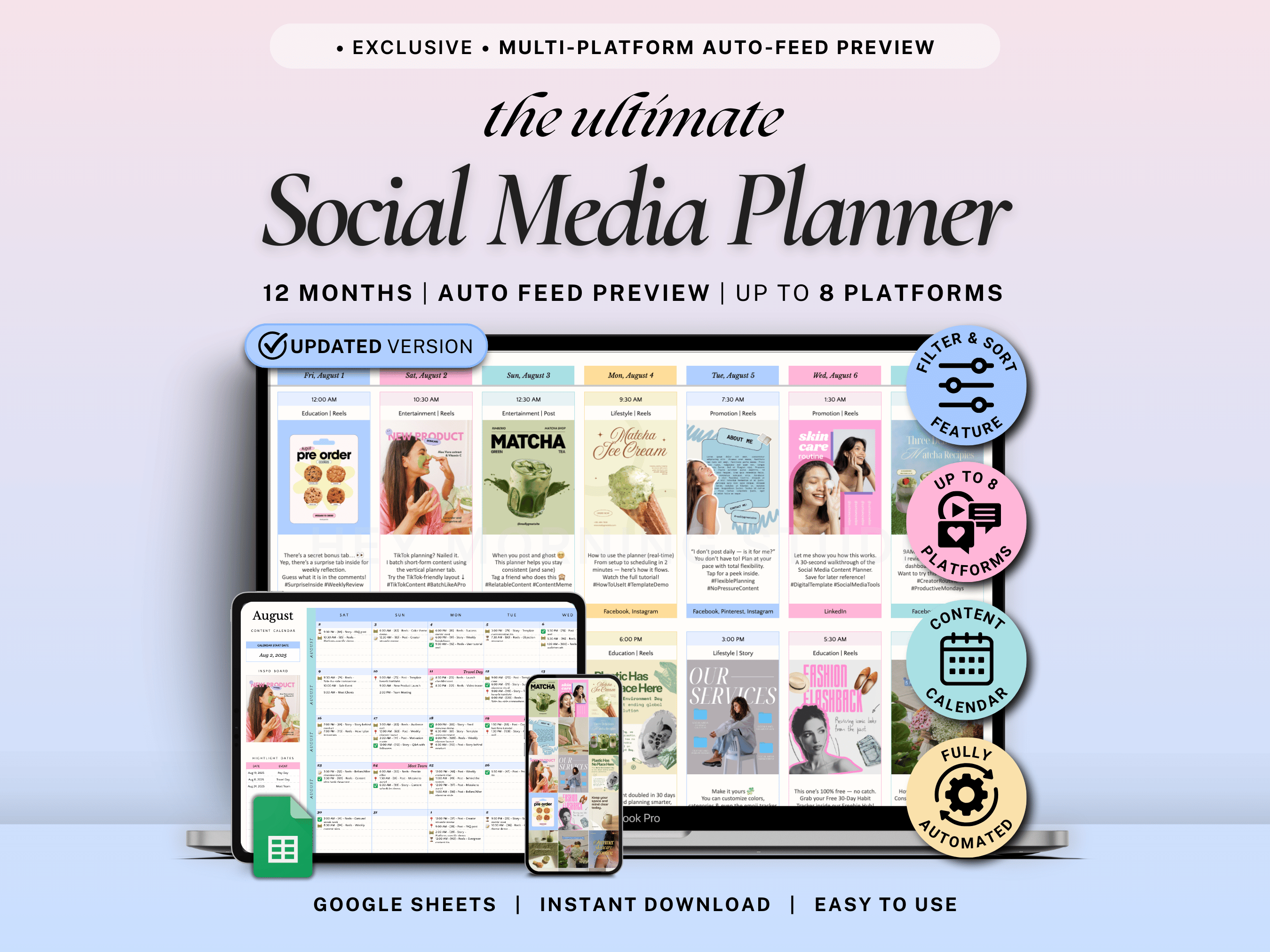
This planner includes an automated feed preview that allows you to:
-
Select a specific feed
-
Choose a specific date
-
Visualize how planned posts appear next to each other
This makes it easier to spot gaps, repetition, or imbalance early — while you’re still planning, not after anything is published.
Especially helpful if you care about:
-
Visual consistency
-
Content pacing
-
Brand alignment
See How the Planner Works in Practice
Seeing the system described is helpful — but seeing it in action makes the structure much clearer.
This demo shows how the central content planner, multi-platform feeds, and visual preview work together inside the spreadsheet, so you can understand the full workflow at a glance.
Connected Content Calendar
Your content plan isn’t just stored — it’s fully connected.
The spreadsheet automatically generates a content calendar that shows what’s planned for each date.
Each calendar entry links back to the original planner row, so edits stay fast, accurate, and friction-free.
Long-Term Visibility with Monthly Overviews
For creators who plan ahead, the planner includes 12-month content previews.
At a glance, you can see:
-
Which months are content-heavy or lighter
-
How campaigns and launches are spaced out
-
Where consistency may start to slip
This makes long-term planning easier — without overcommitting or burning out.
Built-In Hashtag Organizer
To reduce repetitive work, the planner includes a hashtag organizer.
You can group commonly used hashtags and select them via dropdown while planning content.
This keeps everything organized and speeds up planning, especially if you reuse hashtag sets across posts or platforms.
Simple Monthly Performance Reflection
While this is not an analytics or publishing tool, it includes a lightweight space for monthly performance reflection.
This helps you:
-
Track high-level growth trends
-
Reflect on what worked
-
Stay aware of progress without overcomplicating your system
Why This Planner Solves Common Spreadsheet Friction
Many spreadsheet planners struggle with:
-
One-platform-only planning
-
No visual overview
-
Manual duplication
-
Disconnected calendars
This system was designed specifically to remove those friction points — while keeping the flexibility spreadsheets are known for.
If you prefer a platform-agnostic planning system that helps you think clearly before posting, this planner is built for that workflow.
If you want to see how creators use this system in practice, you can read:
👉 How I plan an entire month of content using one spreadsheet
Assignment Tracker Google Sheets & Excel: Stay on Top of Every Deadline
Why Google Calendar and To-Do Lists Don’t Work for College Assignments